A truly ergonomic office chair is not defined by its price tag or its marketing copy—it is defined by how well its adjustable features can be configured to fit your body. The National Institutes of Health's workstation self-assessment puts the matter plainly: the first question to ask of any chair is whether its height, seat, and back can each be adjusted to achieve a supported posture. This article distills guidance from occupational health authorities into a single checklist you can use to evaluate any chair, in a showroom or at your own desk.
Beyond Marketing: What Makes an Office Chair Truly Ergonomic?
OSHA's computer workstation guidance identifies the core principle: a good chair provides support to the back, legs, buttocks, and arms while reducing exposure to awkward postures, contact stress, and forceful exertions. Crucially, OSHA notes that increased adjustability ensures a better fit, provides adequate support across a variety of sitting postures, and allows position changes throughout the workday—something that matters even more if multiple people share the chair. The agency's practical advice cuts straight through marketing claims: try out different chairs before purchasing one.
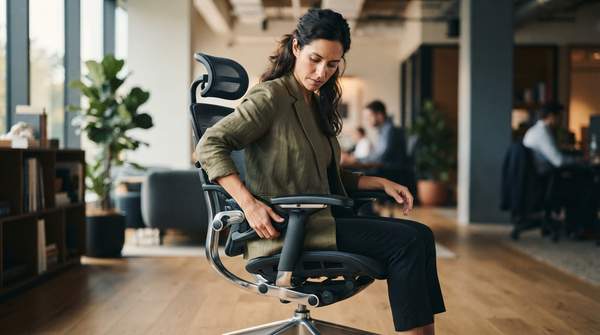
That emphasis on adjustability is what separates a genuinely ergonomic chair from an expensive fixed one. A chair that cannot be tuned to your dimensions forces your body to adapt to it, rather than the reverse. Ergonomics consultancies echo the same test. ErgoPlus, an ergonomics and injury prevention firm, frames chair selection as a series of yes-or-no questions: Is the chair vertically adjustable and on a five-point base? Does it have adjustable lumbar support? Does the seat pan adjust in depth and tilt? Each question targets a specific failure mode—unsupported lumbar curve, pressure behind the knees, feet dangling off the floor.
One caution before the checklist: this guide covers general office work only, and it is not medical advice. If you have existing pain or a musculoskeletal condition, consult a healthcare professional rather than relying on chair selection alone.
The Essential Ergonomic Chair Features Checklist
The table below synthesizes the adjustable features that NIH, OSHA, university safety offices, and ergonomics consultancies consistently identify. Use it as a diagnostic: a chair that fails several rows cannot be made ergonomic, no matter how it is advertised.
| Feature | Ergonomic Goal | Check / Adjustment Guide |
|---|---|---|
| Seat height | Feet flat on the floor or a stable footrest, with knees at or below hip level, supporting circulation and posture. | Raise or lower the seat until feet rest fully on the floor; if the desk is too high, add a footrest rather than raising the chair and letting feet dangle. |
| Lumbar support | Maintains the natural inward curve of the lower back, discouraging slouching. | Position the support at your "belt line"—the curve of your lower back—not your tailbone. It should adjust in height and ideally depth to match your spine. |
| Backrest angle | Supports the entire back and permits recline, encouraging position changes that reduce static load on the spine. | Check for independent angle adjustment or a synchronous tilt with tension control, so the backrest moves with you rather than locking you upright. |
| Seat pan depth | Prevents the seat edge from pressing the back of your knees and lets you lean fully against the lumbar support. | Test the gap between the seat's front edge and the backs of your knees. The University of Pittsburgh's safety office recommends at least a half-inch of clearance; Eureka Ergonomic's adjustment checklist calls for a two-to-three finger gap. Either way, the pan should support roughly three-quarters of your thigh. |
| Seat pan tilt | Allows a balanced seated posture and an open hip angle, easing lower-back pressure. | Look for a tension-adjustable tilt mechanism that responds to your body weight rather than a fixed, flat pan. |
| Armrests | Support the forearms and reduce shoulder and neck strain without blocking movement. | Height-adjustable armrests should let your forearms rest while keeping you close to the desk; they must not interfere with swiveling or pulling in. |
| Base stability | Keeps the chair stable during movement and recline, preventing tipping. | Confirm a five-point base with casters suited to your floor surface—hard casters can skid on hard floors, soft ones drag on carpet. |
Two details deserve emphasis because they are the most commonly botched. First, seat depth: a pan that is too long either catches you behind the knees or prevents full contact with the lumbar support, defeating the chair's most important feature. Second, the seat's front edge should be rounded so it does not press into your legs, as ErgoPlus's checklist notes.